FreeBSD on the GPD MicroPC
I've never been a strict adherent to the Unix software philosophy, and I often find that monolithic software can have real yet lesser-discussed benefits in terms of cohesion; my most used application is Emacs, after all. Naturally, this perspective leads one to the BSDs as a unified alternative to the Gnu/Linux paradigm. To this end, I've experimented on-and-off with FreeBSD and OpenBSD in the past, often enjoying the experience (and the manual!) for a couple weeks before inevitably transitioning back to Linux for widespread compatibility.
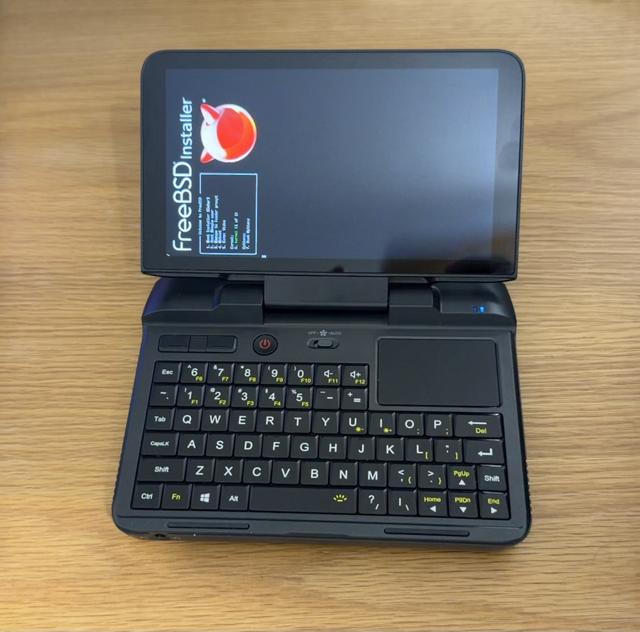
Recently, I purchased a second-hand GPD MicroPC, a fairly powerful device in a Ultra-Mobile PC (UMPC) form factor.
| Processor | Intel Celeron N4100 x 4 |
| Memory | 8.0 GiB |
| Disk Capacity | 256.1 GN |
| Wireless NIC | Intel Dual Band Wireless-AC 3165 |
With these specs, it's easily possible to run Linux, BSDs, or even Windows on a mobile computer that fits in your pocket; you can hold the Micro PC while using it similar to a phone using thumb typing with the built-in keyboard and trackpad, or you can connect it to external peripherals. The port selection is also excellent for such a small container:
"Connectivity is a highlight, even rivaling full-sized industrial PCs, featuring three USB 3.0 Type A ports, one USB Type-C port, an RS232 serial port, RJ45 1GB/s Ethernet port, HDMI port, and a MicroSD card reader. Wireless options include 802.11b/g/n/ac, 2.4G/5G Dual-band Wi-Fi, and Bluetooth 4.2."
I have been interested in finding a way to bring my Emacs setup on-the-go; so far, I've experimented with hosting my orgfiles in a VPS and using TRAMP to remote into them (good for a single-source-of-truth, but bad for latency and required network connection), using iSH to run alpine linux on my phone (good for a mobile terminal, but bad for complex Emacs shortcuts with a mobile keyboard), and a few other shenanigans with file syncing methods, but nothing has been able to quite replicate the usability of Emacs when sitting at a desk with either a laptop or desktop computer. However, the GPD Micro PC (and other UMPCs) offer the ability to use a full, desktop-style keyboard and operating system with just your hands; no desk required. I might go as far to say the GPD Micro PC could be a viable phone replacement if you can replicate or replace your phone's SMS and calling.
Setup and troubleshooting
The actual installation process is fairly standard, but feel free to follow along if you want to replicate my specific tweaks; I'll show what works for me and what rough edges I am still dealing with.
First, I downloaded the amd64 version of FreeBSD 15.0 for a drive-only download, and wrote the image to my installation USB:
sudo dd if=FreeBSD-15.0-RELEASE-amd64-memstick.img of=/dev/sdb bs=1M status=progress && sync
On startup, F7 is used to access the boot menu. The built-in display is actually a vertical display rather than a native horizontal display. As a result, some interfaces (such as BIOS, and the installation wizard) will be sideways. However, most desktop environments have an easy setting option to fix this for daily use. Next, you select the USB from the boot menu.
Before installing, I first wanted to verify that my WiFi interface was compatible, so I selected 2 for "Boot Single user" rather than 1 (or enter) for "Boot installer".
The NIC is visible at the PCI level; running "pciconf -lv | grep -B3 -A3 network" revealed (in addition to the ethernet interface):
none14@pci0:1:0:0:      class=0x02800 rev=0x79 hdr=0x00 vendor=0x8086 device=0x3165 subvendor=0x8086 subdevice=0x8110
    vendor     = 'Intel corporation'
    device     = 'Wireless 3165'
    class      = network
With this, I was satisfied enough to try installing, so I restarted and selected option 1 to Install.
The FreeBSD graphical installer is still sideways, but the install was typical otherwise. Also, the WiFi interface was detected automatically which made the installation process smooth.
Next, I could finally log into my fresh FreeBSD installation and do some housekeeping. As root, I installed doas and added my user account to the wheel group (pw groupmod wheel -m [username]). Then, I could install xorg and xfce (doas pkg install xorg xfce) and enable dbus and hald (doas sysrc dbus_enable=YES then doas sysrc hald_enable=YES). Then, I wrote to ~/.xinitrc with ". /usr/local/etc/xdg/xfce/xinitrc".
I ran into a weird issue where my home directory was owned by root rather than my own user so I had to run doas chown -R [username]:[username] /home/[username]. After that, I tried to run startx, but the X server fails with the error "Fatal server error: Cannot run in framebuffer mode. Please specify busIDs for all framebuffer devices". This issue was caused by the integrated Intel GPU which could be fixed by installing and enabling the expected driver:
- Install DRM/KMS (
doas pkg install drm-kmod) - Enable Intel KMS driver (
doas sysrc kld_list+=" i915kms") - Reboot
Now, startx successfully launches XFCE in an X server, but it is still sideways and we do not have battery/power information. Launch the built in "Display" application then set "Rotation" to "Right" in order to force a standard laptop orientation. XFCE already has access to the battery status; and we can add the expected battery percentage indicator to the top bar by adding the "Power Manager Plugin" item in the Panel Preferences.
Then, I could simply install rsync to copy my files over my local network. At idle, the CPU usage is hovering around 3% and memory use is ~17% (1.4 GiB / 7.8 GiB).
Now, all that is left is to polish some of the rough edges.
Built-in speakers:
- Visible with "cat /dev/sndstat"
- Install pipewire (pkg install pipewire wireplumber pipewire-spa-oss)
- Install user interface (pkg install xfce4-pulseaudio-plugin pavucontrol)
- Add "PulseAudio Plugin" to panel
- Now can control audio using volume keys or interface
I am still dealing with a couple of unexpected challenges. Some of these can be partially mitigated by being intentional, but they detract from the overall experience. For example, I receive an error when trying to mount a USB drive using the XFCE GUI, despite my user being in the "operator" group. Also, the built-in fan does not appear to be managed by the system, and closing the lid does not automatically trigger hibernation. Also, due to some conflicts with the integrated GPU, X server hibernation is oddly temperamental.
All of these are relatively minor and have obvious workarounds: mount USBs manually on the command line, throttle in software if the internals are too hot, and shut down the system between uses, but they are challenges that make FreeBSD harder to recommend for casual, daily use on a device intended to be accessible on the go.
Comparison to Debian
FreeBSD on the MicroPC works but you have to be intentional about your approach to softening rough edges. On the other hand, I had previously installed Debian with GNOME and everything worked immediately out of the box, including the built-in speakers, display brightness, thermal-triggered fan, and closing the lid to hibernate. Part of this is due to the differences in design philosophy and intentionality of user control; however, it's clear to me that the Debian user experience is objectively smoother.
If your goal benefits from BSD in particular, then FreeBSD will work on the GPD MicroPC; however, I would recommend Debian (or another Linux distro) for the vast majority of interested parties.
Last updated April 21, 2026