How to send an email
This is a follow up (part 6) to Buffer Overflows Considered Harmful.
After writing the previous webpage where I correct some of the more egregious issues with the codebase, I sent an email to bob@pokey.onl from Gmail. It was accepted and saved, then I was able to retrieve it using mpop to see this:
Received: from mail.pokey.onl (mail.pokey.onl [96.126.120.46])
        by pokey.local (mpop-1.4.21) with POP3
        for <pokey>; Thu, 09 Apr 2026 04:36:58 -0500

... (redacted for privacy) ...

Subject: First email from gmail
To: bob@pokey.onl
Content-Type: multipart/alternative; boundary="0000000000003e961c064eda7dac"

--0000000000003e961c064eda7dac
Content-Type: text/plain; charset="UTF-8"

Hello Bob,

If this works, this will be the first email received by the minimum viable
email server that was sent from an external SMTP server.

Fingers crossed,
pokey

--0000000000003e961c064eda7dac
Content-Type: text/html; charset="UTF-8"
Content-Transfer-Encoding: quoted-printable

<div dir=3D"ltr"><div>Hello Bob,</div><div><br></div><div>If this works, th=
is will be the first email received by the minimum viable email server that=
 was sent from an external SMTP server.</div><div><br></div><div>Fingers cr=
ossed,</div><div>pokey</div></div>

--0000000000003e961c064eda7dac--
Now that I have demonstrated receiving email from an external email provider, the most natural next step is implementing the ability to respond.
There are two types of requirements to send email from this email service to another one. First, we need to support the proper outbound protocol to communicate mail legibly. Second, we need to implement extensions, encryption, and reverse DNS so other servers can actually trust the mail we are sending them.
In practice, sending an email follows a predictable sequence:
- User composes email using mail client
- Mail client connects to provider's SMTP server using SMTP Submission
- Provider's SMTP server authenticates user, delivers to local recipients (same provider), and queues worker jobs for external recipients (different provider)
- For each external recipient, MX records are looked up to determine where to send the mail
- Provider's server acts as SMTP client to send mail to external recipient's SMTP server; recipient uses SPF and rDNS to evaluate sender
- Recipient's SMTP server validates request and sending server with DKIM/DMARC
- Recipient's server stores mail for recipient, if it passes filters
- Recipient accesses mail from their provider using POP3 or IMAP
Outbound protocol
The SMTP standard includes both a client and server. Somewhat counterintuitively, we need to implement both to handle outbound mail. Our service handles SMTP as a server in order to receive mail from other SMTP clients or a mail application, but it must also be able to act as a client to communicate outgoing mail to other SMTP servers.
Outgoing mail follows a specific pipeline through various protocols and standards. To begin, a mail client (such as an email application on the user's device) authenticates with the SMTP server then provides a message in Internet Message Format (RFC 5322), which includes headers as well as a message body. If the user has permission to send from our SMTP server, the message is then sent to its recipients. Local recipients can be handled immediately by writing to the Maildir system on our VPS. External recipients require additional support.
In order to improve deliverability, outgoing mail is handled by a dedicated queue with temporary local storage and delayed retry attempts. In each attempted connection, the worker thread is assigned a queue job, fetches the MX record for the associated recipient's domain, opens an SMTP connection to that destination server, and executes the SMTP connection sequence per RFC 5321. Any issues are logged and temporary errors (i.e. 4xx error codes) will result in a retry later. If a permanent failure is encountered (i.e. 5xx error code), the current approach will notify the postmaster account. Following a successful delivery (i.e. 2xx error code), the queue job is deleted.
I skipped over a few important details in the above summary. For instance:
- It is important to ensure only approved local users can send mail from our SMTP server to prevent acting as an "open relay". Unauthorized attempts will be met with a "550 Relaying denied" error.
- The SMTP server will prepend a "Received:" trace header in the RFC 5322 standard to add a note of our processing.
- The remote queue jobs are per-recipient rather than per-message as outbound connections may fail to any subset of recipients, necessitating the treatment of message recipients independently.
- The outbound worker is the third thread handled by
main.c, in addition to the SMTP server and POP3 server. - The queue local storage format is a minimal, custom design as it is not specified by SMTP which only dictates communication.
SPF/DKIM/DMARC
I like the wording that Cloudflare uses to describe these standards in a page titled "What are DMARC, DKIM, and SPF?":
DMARC, DKIM, and SPF are three email authentication methods. Together, they help prevent spammers, phishers, and other unauthorized parties from sending emails on behalf of a domain they do not own.
As an overview:
- Sender Policy Framework (SPF) lists what ip addresses are authorized to send emails for the associated domain.
- DomainKeys Identified Mail (DKIM) is an encryption standard used to prove that mail originated from the claimed domain.
- Domain-based Message Authentication Reporting and Conformance (DMARC) defines a policy for what the recipient should do with mail that fails SPF and/or DKIM.
All three are stored as DNS records associated with the email sender's domain for consistent lookup by other email services.
For SPF, I am using the following record:
pokey.onl. IN TXT "v=spf1 mx a -all"
This is interpreted as a DNS TXT record for pokey.onl. The first part (v=spf1) indicates this is a SPF record; Then mx indicates that the mail server listed in the MX record is permitted to send mail for this domain. Using a extends this to allow any server listed in the domain's A record. Finally, -all indicates that all source sources are prohibited (and thus should be not be trusted by any recipient).
For DKIM, we need a DNS record that provides the public key associated with our domain's private key. In my example, I am using the following record:
pes._domainkey.pokey.onl. IN TXT "v=DKIM1; k=rsa; p=MIIBIjANBgkqhkiG9w0BAQEFAAOCAQ8AMIIBCgKCAQEAyTWDq4euOF7W4IOjny73+5QKV2cMgB/L9GtvRAk15mW0MYEL+gWkv3R/6RSRJPGn7nkEHYP0YY/KQoIEuOz+mSYHfd7gipYuPA6Q2cdFCRRjWjwgO7yug5gfdOagkeJzbUcqjN6+6omQTRFIPO2GxG4ta0fOuaFcfT0mX43XfmoBuNT+LG7edKXg5EPL0iCjOpXDhBpGYDlAkSYPAE15NTAYkm2hKBZgvuQTyDchB+25KHf+kEhKkquKVvYcy0n7esYfMHTyYZLVDPIj0WPfgJDh1fNdR/su/zGHIZJQTOEvX0QGPKPGM2zhspBUDPshMScxWuDSZ9IxJc/gs0SDEwIDAQAB"
Similar to SPF, this is DNS TXT record, but I am also specifying a selector by the string "pes" which is the name for a corresponding DKIM key. This string is arbitrary (but most be consistent) so I am using an acronym for "Pokey's Email Service". The rest of record is simply specifying the standard (v=DKIM1), the encryption key type (rsa), and the public key (string after p=).
Finally, we also specify the DMARC record:
_dmarc.pokey.onl. IN TXT "v=DMARC1; p=reject; rua=mailto:postmaster@pokey.onl; adkim=s; aspf=s"
Just like SPF and DKIM, this is also a DNS TXT record with the standard listed after v=. I set p=reject to instruct any recipient to reject mail which fails strict alignment with DKIM and SPF (due to adkim=s; aspf=s). Aggregated reports of blocked mail should be sent to the rua address, which I set to the SMTP postmaster address for my domain.
All of these records can be seen verbatim with the dig command.
Note that I am currently focusing on outbound deliverability, but we will want to perform these same checks for inbound mail to ensure that local users are receiving legitimate mail from authenticated users.
STARTTLS
The modern, big-name email providers expect other email services to employ additional standards (for good reason) to strengthen the trustworthiness of mail they receive. Another strong recommendation for deliverability to such SMTP servers is support for Transport Layer Security (TLS) encryption to secure mail data in transit.
The STARTTLS extension to SMTP is defined in "SMTP Service Extension for Secure SMTP over Transport Layer Security" (RFC 3207). When a SMTP client connects to an SMTP server and issues EHLO, the server lists its extensions, such as "STARTTLS". If the client selects this option, then the socket is upgraded with OpenSSL and all information obtained prior to TLS is abandoned. OpenSSL is an external dependency; however, I am considering it outside of the scope of this project to re-develop.
Sending mail
With the basics of the outbound protocol in place, I tried my first attempt at sending an email to another SMTP server:
- Push project to VPS with rsync
- Build (
make clean all) - Start server (
./build/pes & echo $! > pes.pid) - Submit message to mail locally from VPS (
printf 'EHLO localhost\r\nMAIL FROM:<bob@pokey.onl>\r\nRCPT TO:<REDACTED@gmail.com>\r\nDATA\r\nFrom: Bob <bob@pokey.onl>\r\nTo: REDACTED <REDACTED@gmail.com>\r\nSubject: PES to Gmail Test\r\n\r\nHello from PES.\r\n.\r\nQUIT\r\n' | nc 127.0.0.1 25) - Receive failure:
S(out): 550-5.7.1 [2600:3c00::2000:deff:fe72:cc40] Gmail has detected that this message
S(out): 550-5.7.1 does not meet IPv6 sending guidelines regarding PTR records and
S(out): 550-5.7.1 authentication. For more information, go to
S(out): 550 5.7.1  https://support.google.com/mail/?p=IPv6AuthError 5614622812f47-478a4bb9855si4775133b6e.88 - gsmtp
C(out): QUIT
Outbound delivery failed permanently for REDACTED@gmail.com: 550 5.7.1  https://support.google.com/mail/?p=IPv6AuthError 5614622812f47-478a4bb9855si4775133b6e.88 - gsmtp
This demonstrates that the current code can atleast find the expected endpoint and send SMTP requests; however, we reached a permanent deliverability failure as a result of some IPv6 issues. When configuring my VPS and DNS, I had only considered IPv4 so I would imagine this mismatch is the root cause of this error. This is stated directly in the link that Google graciously provided:
Fix IPv6 authorization errors

An IPv6 authorization error could mean that the PTR record for the sending server isn't using IPv6. If you use an email service provider, confirm they're using an IPv6 PTR record.

Here's an example of an IPv6 authorization error:

550-5.7.1: Message does not meet IPv6 sending guidelines regarding PTR records and authentication.
My first approach was to force IPv4 for outbound send, so I updated hints.ai_family to be set to AF_INET (instead of AF_UNSPEC) in connect_to_smtp_host.
With that one simple change, the email was delivered to my Gmail inbox!
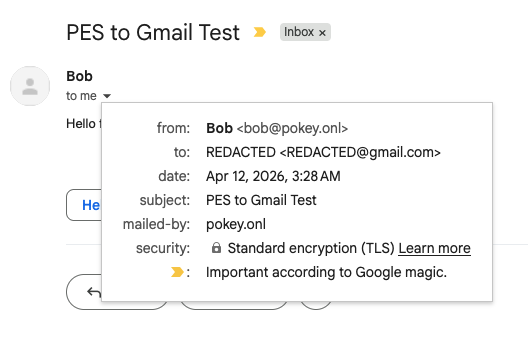
I opened the email and selected the "Show original" option, I was given the following information:
| Created at: | Sun, Apr 12, 2026 at 3:28 AM (Delivered after 1 second) |
| From: | Bob <bob@pokey.onl> |
| To: | REDACTED <REDACTED@gmail.com> |
| Subject: | PES to Gmail Test |
| SPF: | PASS with IP 96.126.120.46 |
| DKIM: | 'FAIL' with domain pokey.onl |
| DMARC: | 'FAIL' |
Despite writing the DNS records correctly in this webpage, I made a simple entry mistake in my domain hosting dashboard. However, despite failing DKIM and DMARC, apparently SPF alone was sufficient to reach my Gmail inbox. I am not sure what all factors they consider; however, I had used this same Gmail address to send to bob@pokey.onl before so it may have been more trusted than an arbitrary SMTP server.
After correcting the DNS TXT records, I sent another test email. This one correctly passed both DKIM and DMARC; however, it was sent to my spam folder. Perhaps sending a follow-up email so quickly from an essentially-unknown domain flagged it.
Progress
Here is the current progress summary for this project:
| Capability | Standard/support | Status |
|---|---|---|
| Receive mail | SMTP (RCC 5321) | Implemented |
| IMF (RFC 5322) | Implemented | |
| MIME (RFC 2045-2049) | Supported* | |
| Store mail | Local user accounts | Implemented |
| Maildir | Implemented | |
| Read mail | ||
| POP3 (RFC 1939) | Implemented | |
| Send mail | SMTP Submission (RFC 6409) | Unimplemented |
| STARTTLS (RFC 3207) | Implemented | |
| SPF, DKIM, DMARC, TLS | Implemented |
Moving forward, I need to implement certificate checking for outbound, STARTTLS support as an STMP server, and TLS for POP3. Although I am not interested in IPv6 in the near future, it would be a good option to support.
Last updated April 12, 2026
Addendum
After checking the filesystem, I realized that I had actually received a notice of the failure to send my first test email in the postmaster Mailbox. This notice, in the form of a email that the postmaster could read using his own client, also contained the reason and code provided by Gmail servers, as expected.
Last updated April 13, 2026